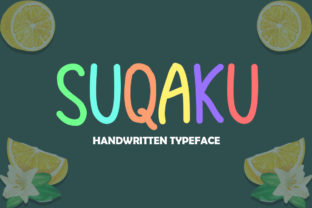
Suqaku: A Playful Display Font Built for Real Creative Workflows
Suqaku isn’t just another decorative typeface—it’s a functional tool designed to slot into the middle of your creative process, not sit on the shelf. Whether you’re finalizing a t-shirt design at 2 a.m., preparing a workshop handout for 30 educators, or building a landing page that needs to stand out without sacrificing clarity, Suqaku delivers visual energy while holding up under practical use. Its playful yet intentional rhythm makes it ideal where personality matters—but professionalism can’t be compromised.
Where Suqaku Fits in Your Workflow
Most display fonts are either too rigid for expressive work or too chaotic for consistent branding. Suqaku bridges that gap by balancing distinct character shapes with strong typographic structure. That means it works *before* a project starts (as a mood-setter in early mockups), *during* execution (as the hero text in a live website header or printed poster), and *after* delivery (in social assets, email banners, or product packaging). It’s not an afterthought—it’s part of the planning phase because its tone informs decisions about color, spacing, imagery, and hierarchy from day one.
For example, if you’re a small business owner launching a new line of illustrated stationery, choosing Suqaku early helps align your designer, copywriter, and printer around a shared visual language. You don’t need to explain “playful but trustworthy”—the font communicates that. That alignment saves time in revisions and reduces misalignment between brand voice and visual execution.
Practical Use Cases—Beyond the Obvious
Suqaku shines where attention is scarce and intent is high: website headers, music album covers, event flyers, photo frame overlays, and even classroom posters for educators. But its real utility emerges in less obvious places:
- Print-ready consistency: Suqaku includes full OpenType support, so ligatures, stylistic alternates, and multilingual characters behave predictably across Adobe Creative Cloud, Affinity apps, and modern web platforms—no last-minute font substitution surprises.
- Responsive headings: When used as a CSS @font-face resource, Suqaku scales cleanly from mobile headlines to large-format prints. Its generous x-height and open counters maintain legibility even at smaller sizes—unusual for display fonts.
- Brand extension: Freelancers and agencies use Suqaku to unify client deliverables—e.g., matching the font on a presentation deck, a printed pitch booklet, and the “Coming Soon” banner on their client’s site—without needing custom illustration or extensive UI redesign.
It also integrates smoothly with common tools: Figma auto-suggests Suqaku when typing headline text; Canva users apply it directly in templates; WordPress themes with custom font upload support render it reliably in headers and sliders. No plugin required—just upload and assign.
Preparing for Implementation
Before dropping Suqaku into a project, consider three practical prep steps:
- Define its role: Decide whether Suqaku will serve as a primary display font (for logos, titles, quotes) or a secondary accent (for callouts, labels, or interactive elements). Avoid using it for body text—its design prioritizes impact over extended reading.
- Pair intentionally: Suqaku pairs best with clean, neutral sans-serifs like Inter, Poppins, or Lato for supporting text. The contrast gives hierarchy without visual competition. Avoid overly decorative or condensed companions—they dilute Suqaku’s clarity.
- Test early, test often: Preview how Suqaku renders on actual devices—not just your high-res monitor. Check contrast against background colors using browser dev tools, and verify print proofs before bulk runs. Its rounded terminals and subtle bounce respond differently to ink spread and screen gamma than geometric fonts do.
This preparation isn’t overhead—it’s quality control. Skipping it risks inconsistent spacing, unexpected kerning gaps, or poor legibility in low-light contexts (like dimly lit event venues or older mobile screens).
Integration Across Platforms and Teams
Suqaku simplifies cross-platform workflows because it ships in standard formats (.woff2, .otf, .ttf) with clear licensing terms. Designers share the same file with developers; marketers embed it in Mailchimp templates; educators load it into Google Slides via third-party font loaders. There’s no version fragmentation—just one reliable asset moving through your stack.
For teams, this means fewer “Why does this look different?” moments. A marketer building a flyer in Canva sees the same weight and spacing a developer implements in CSS. A blogger adding a featured quote to a post gets identical rendering whether publishing on WordPress, Substack, or Ghost—provided the font is properly hosted or linked.
Long-term, Suqaku supports consistency across evolving projects. If you launched a podcast last year with Suqaku on your cover art, you can reuse it confidently on this year’s merch, newsletter banners, or live-stream graphics—no rebranding needed. Its style has enough personality to feel cohesive, but enough restraint to avoid dating quickly.
Workflow Efficiency and Decision Clarity
Choosing a display font often stalls projects. Too many options. Too much second-guessing. Suqaku shortens that loop. Its design rationale is clear: friendly but focused, bold but breathable, distinctive but deployable. That clarity translates directly into faster decisions—especially for non-designers managing their own branding.
Freelancers report cutting 1–2 rounds of client feedback on logo lockups when using Suqaku as the primary wordmark font. Why? Because its shape invites interpretation without ambiguity—it reads as “creative,” “approachable,” and “intentional” all at once. Clients recognize tone faster, freeing up discussion for layout, color, and messaging instead of debating whether the font “feels right.”
For educators building learning materials, Suqaku helps signal section breaks or key concepts without relying solely on color or icons—useful for accessibility and print-friendly versions. For bloggers, it adds visual punctuation to quote blocks or featured insights, guiding readers’ eyes without disrupting flow.
Usability Over Ornamentation
What sets Suqaku apart isn’t novelty—it’s usability engineered into its curves and spacing. Its letterforms avoid extreme contrast or exaggerated terminals that break down at small sizes or in low-resolution outputs. The lowercase ‘a’, ‘g’, and ‘y’ have open apertures and consistent stroke endings, improving recognition across contexts—from a QR code-linked flyer viewed on a phone to a vinyl decal applied to a coffee cup.
That attention to detail means less manual tweaking. No need to adjust tracking on every headline. No need to rebuild kerning pairs for each new application. And no need to swap fonts mid-project because one size “just doesn’t work.”
It’s also built for longevity. Unlike trend-driven fonts that peak and fade, Suqaku’s balance of playfulness and structure gives it staying power. It supports iterative refinement—you can evolve your brand’s visuals around it, not away from it.
Making It Your Own
The most effective use of Suqaku happens when it’s treated as a collaborator—not a decoration. Try this: before your next project kickoff, open a blank document and set three lines of text in Suqaku at different sizes. Then ask: What feeling does this evoke *before* any other design choices? Does it match the audience’s expectations? Does it leave room for photography or illustration to breathe? Does it scale meaningfully across your intended touchpoints?
If the answer is yes across two or more points, you’ve found your anchor. From there, build outward—color, layout, imagery—not inward, trying to force the font to fit a vague idea. That shift in approach turns Suqaku from a visual choice into a strategic one.
Whether you’re launching a side hustle, teaching a workshop, designing for a nonprofit, or refreshing your portfolio, Suqaku works best when it’s selected with purpose—not just for flair, but for function. It’s ready when you are.