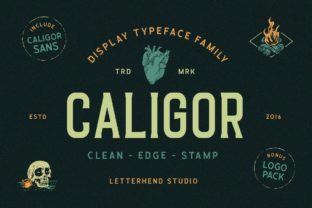
Caligor: A Display Font Family Built for Crafting with Purpose
Caligor is a display font family designed for impact, clarity, and expressive versatility—not just visual appeal. It’s not meant for body text or long-form reading. Instead, Caligor thrives where attention must be directed: headlines, logos, product packaging, social media graphics, workshop signage, and handmade labels. Its strength lies in how it integrates into real-world creative workflows—not as an afterthought, but as a deliberate tool that supports intentionality from concept to completion.
Where Caligor Fits in the Creative Process
Most designers and makers treat typography as either a starting point or a finishing touch. Caligor works best when treated as a mid-process anchor—something you reference early to shape tone, then refine later to reinforce message. For example, if you’re launching a small-batch candle line, choosing Caligor before finalizing your color palette helps ensure visual cohesion: its bold, slightly organic weight pairs naturally with earthy tones and hand-drawn illustrations. That decision informs photography styling, label layout, and even email subject lines—making Caligor part of your brand’s operational rhythm, not just its surface layer.
It’s also useful during iterative phases. When prototyping a workshop flyer or digital course landing page, swapping between Caligor’s styles—like Caligor Bold for section headers and Caligor Light Italic for pull quotes—lets you test hierarchy without rebuilding layouts. This saves time during feedback loops with clients or collaborators because the typographic voice stays consistent while other elements evolve.
Practical Use Cases Across Roles
Different users interact with Caligor in distinct ways—each tied to their workflow priorities:
- Small business owners use Caligor for product tags and in-store signage because its high legibility at medium sizes means customers read key details (e.g., “Small Batch • Hand-Poured • Soy Wax”) without squinting—even under uneven lighting.
- Educators and workshop facilitators apply Caligor Outline or Caligor Shadow versions to printable handouts and slide decks. The subtle dimensionality draws eyes to learning objectives or activity prompts without overwhelming content density.
- Freelance designers and marketers keep Caligor installed locally and synced across Adobe Creative Cloud and Figma libraries. That way, they can drop it into mockups for client review and transition seamlessly into final asset delivery—no last-minute font substitutions or licensing hiccups.
- Hobbyists and crafters pair Caligor with cutting machines like Cricut or Silhouette. Its clean vector outlines render cleanly at any scale, whether etching onto leather journals or vinyl-cutting wall decals for home studios.
Integration With Tools and Platforms
Caligor works reliably across common design and production environments—but integration isn’t automatic. You’ll need to install the desktop files (.otf or .ttf) for full access in Illustrator, InDesign, or Affinity apps. For web use, self-hosting via @font-face ensures control over loading performance and fallback behavior—especially important if you’re embedding Caligor into a Shopify theme or WordPress site for branded email headers.
In collaborative tools like Figma, upload Caligor to your team library and set it as a local variable for heading styles. That keeps everyone aligned on which weight maps to H1 vs. H2—reducing revision rounds when stakeholders request “more visual hierarchy.” Likewise, in Canva, add Caligor to your Brand Kit so it appears alongside your hex codes and logo lockups—making it easier for non-designers (like admin staff or interns) to maintain consistency across social posts.
Preparing for Consistent, Long-Term Use
Before deploying Caligor across multiple projects, take five minutes to define usage boundaries. Ask yourself: Which weights will I use for what? How large should Caligor appear at minimum for readability? What’s my go-to pairing for body copy (e.g., Inter, Lora, or Source Sans Pro)? Documenting these answers creates a lightweight style guide—no formal branding manual required. Even a shared Notion doc with screenshots and usage notes prevents drift over time.
Also consider file management. Store Caligor’s license confirmation and version number in the same folder as your brand assets. Fonts update occasionally—new weights get added, bugs get patched—and knowing you’re using v2.1 instead of v1.8 avoids unexpected rendering differences between a printed brochure and its PDF proof.
Efficiency Tips for Daily Workflow
You don’t need to reinvent your process to use Caligor well. Start small:
- Replace one default headline font in your next project with Caligor Bold—then assess how it changes emphasis and pacing.
- Create a reusable template in Google Slides or Keynote with Caligor applied to title and subtitle placeholders. Duplicate it for every new presentation.
- Add Caligor to your email signature generator (like HubSpot or Mailchimp) for branded newsletter headers—just one line of CSS or a prebuilt module.
- If you manage print orders, send Caligor-rendered PDFs—not editable .ai or .psd files—to your printer. That eliminates font substitution risks and speeds up proofing.
Quality Control and Real-World Testing
Typography quality isn’t just about aesthetics—it’s about function. Before finalizing anything with Caligor, test it in context:
- Print a sample label at actual size and hold it under the lighting conditions your customer will see it in (e.g., dim café lighting or bright outdoor market sun).
- View a web banner on mobile—zoom out to 50% and confirm letter spacing remains readable.
- Ask someone unfamiliar with your project to glance at a Caligor-based poster for three seconds. What do they remember first? If it’s not your core message or brand name, adjust weight, size, or contrast—not the font itself.
This kind of testing reveals whether Caligor is serving your goals—or simply decorating them. It’s rarely the font that fails; it’s the mismatch between typographic intent and environmental reality.
Thinking Beyond the First Project
Using Caligor once is easy. Using it meaningfully over months or years requires intention. Track where it adds value: Does it shorten time spent revising marketing assets? Does it increase engagement on Instagram carousels? Does it help customers recognize your products faster on crowded shelves? These aren’t vanity metrics—they reflect how well Caligor supports your broader workflow efficiency and brand clarity.
Over time, you may find Caligor becomes shorthand—for yourself and others—in planning conversations. Saying “Let’s try Caligor Bold here” communicates tone, scale, and priority faster than describing abstract concepts like “more authoritative” or “slightly warmer.” That shared language reduces friction in cross-functional work, especially when coordinating with copywriters, developers, or vendors who don’t live in design tools daily.
Ultimately, Caligor isn’t about standing out for the sake of novelty. It’s about reinforcing decisions already made—about audience, message, and medium—so your effort lands with precision, not noise. Whether you’re labeling a jar of preserves or designing a conference identity system, Caligor gives your work a grounded, human-centered presence. And in a world saturated with generic templates and algorithm-driven visuals, that kind of thoughtful distinction doesn’t just look good—it works.