Gravy: A Display Font That Balances Playfulness and Purpose
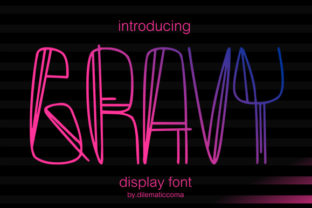
Gravy is a display font designed to command attention—not through sheer size or weight, but through its distinctive, hand-influenced shape. Its letterforms feature soft, rounded terminals, subtle irregularities, and a gentle bounce in baseline rhythm. Unlike many display fonts that lean heavily into either cartoonish exaggeration or rigid geometric precision, Gravy occupies a middle ground: expressive enough to feel human, structured enough to remain legible at moderate sizes.
What Makes Gravy Different—Beyond the Surface
At first glance, Gravy’s charm lies in its organic contours—letters like “a”, “g”, and “s” have open, airy counters and slightly asymmetrical curves. But its distinction runs deeper than aesthetics. Gravy was built with intention for *use*, not just ornament. Its x-height is generous, spacing is carefully tuned for readability in short bursts (think headlines, logos, packaging labels), and its lowercase forms retain strong personality without sacrificing clarity.
This balance sets Gravy apart from fonts that prioritize either pure functionality (like many neutral sans-serifs) or maximal visual impact (such as tightly kerned, high-contrast display fonts). It avoids the fatigue that can come with overly stylized alternatives—fonts where every character feels like it’s shouting—and instead offers warmth and approachability without compromising typographic integrity.
Where Gravy Fits in the Display Font Landscape
Display fonts fall into several broad categories: geometric, retro, handwritten, brush-inspired, and illustrative. Gravy sits closest to the handwritten and soft-rounded subcategories—but with key differences. While many handwritten fonts rely on simulated pen pressure or erratic stroke variation, Gravy uses consistent stroke contrast and intentional simplification. This gives it more versatility across digital and print contexts, especially where rendering consistency matters (e.g., web use with variable font loading or small-screen rendering).
Compared to other rounded display fonts, Gravy avoids the “bubble-letter” effect—its curves are nuanced, not uniform. Letters don’t feel inflated or overly smoothed; instead, they suggest gentle motion and tactile craft. That makes it less likely to clash with minimalist layouts or modern UI components, where some bolder display fonts might overwhelm supporting text or interface elements.
Strengths You Can Rely On
- Strong visual identity with low cognitive load: Readers grasp Gravy’s tone quickly—friendly, confident, unhurried—without needing to decode stylistic quirks.
- Effective at small-to-medium display sizes: Works well at 24–60px in web headers or printed product tags, where many highly decorative fonts blur or lose character.
- Good pairing potential: Its relaxed energy complements clean, neutral sans-serifs (e.g., Inter, Lato, or even system fonts like San Francisco or Segoe UI) without competing for attention.
- Consistent performance across formats: Available in standard OpenType and web-friendly WOFF2 formats, with reliable hinting for screen use.
Tradeoffs Worth Noting
No display font excels in every context—and Gravy is no exception. Its strengths become limitations in specific scenarios. For example:
- Not suited for body text: Like most display fonts, Gravy lacks the fine-tuned spacing, ascender/descender balance, and character density needed for extended reading. Using it beyond short headings or callouts risks reducing comprehension and increasing eye strain.
- Limited language support in some versions: While core Latin characters are well-covered, extended diacritics or non-Latin scripts may be absent or inconsistently rendered depending on the release. Always verify glyph coverage before committing to multilingual projects.
- Less effective in high-contrast or data-dense environments: In dashboards, infographics, or technical documentation where clarity must override personality, Gravy’s expressive nature can distract rather than clarify.
When Gravy Is the Right Choice
Gravy shines when the goal is to convey approachability without sacrificing professionalism—or when a brand seeks visual distinction without resorting to irony or nostalgia. Consider it for:
- Branding elements where tone matters as much as recognition—e.g., a wellness app’s launch headline, an indie bakery’s packaging, or a children’s education platform’s section titles.
- Marketing assets that benefit from warmth and memorability: email subject lines, social media banners, event posters, or limited-run merchandise.
- UI components where hierarchy needs emphasis but not severity—such as onboarding step labels, feature highlights, or CTA buttons in consumer-facing web apps.
In each case, Gravy supports intent rather than overriding it. It doesn’t try to be everything; it aims to be *just enough*—distinctive yet grounded, fun yet functional.
When Another Option Might Serve Better
Gravy isn’t the answer if your priority is neutrality, scalability across vast typographic systems, or strict adherence to accessibility guidelines for dynamic text resizing. For instance:
- If you’re building a government service portal where legibility, predictability, and WCAG compliance are non-negotiable, a tested, highly legible sans-serif remains the safer foundation.
- If your design system already uses a strong, established display font—say, one with strong heritage associations or tight integration with iconography—introducing Gravy may dilute cohesion unless carefully managed.
- If you need ultra-flexible typographic control (variable axes for weight, width, slant), Gravy’s current releases don’t offer those features. Fonts built as variable fonts may better suit evolving design needs.
Practical Evaluation Tips
Before choosing Gravy—or any display font—test it in real conditions, not just mockups:
- Render it at actual sizes on the devices and screens your audience uses. Does it hold up at 32px on mobile Safari? Does it stay crisp when scaled in responsive CSS?
- Check contrast ratios against your background colors using tools like WebAIM’s Contrast Checker. Gravy’s rounded forms can sometimes soften perceived contrast, especially in lighter weights.
- Test with real content, not just “The quick brown fox…” Use actual headlines, product names, or taglines. Does “Organic Granola” feel inviting in Gravy? Does “Q3 Financial Report” feel appropriate—or unintentionally casual?
- Compare side-by-side with at least two alternatives: one more neutral, one more expressive. Notice how Gravy positions itself between them—not too safe, not too loud.
Final Perspective
Gravy stands out because it resists easy categorization. It’s not “cute,” nor is it “serious.” It’s not minimal, nor is it ornate. Instead, it offers a rare kind of typographic hospitality: welcoming without oversimplifying, distinctive without demanding attention. That makes it valuable—not as a default, but as a considered choice.
Like selecting any design element, choosing Gravy comes down to fit: Does it align with your message, audience expectations, and implementation constraints? Does it enhance meaning—or simply decorate? When used with intention, Gravy adds quiet confidence to a design. When used without alignment, it can feel disconnected or incongruous. The difference isn’t in the font itself—it’s in how thoughtfully it’s placed within the whole.