Revenant: A Bold Display Font for Impactful Design
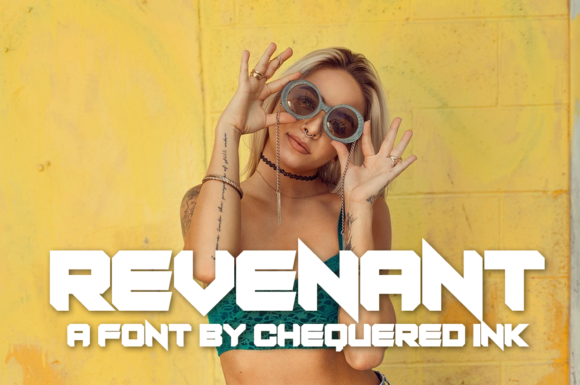
When your headline needs to stop scrolling—not just be seen—Revenant delivers. Designed by Chequered Ink, this display font isn’t built for body text or subtle refinement. It’s made for presence: sharp angles, confident contrast, and a distinctive rhythm that balances modern structure with expressive character. Whether you’re launching a boutique brand, designing a book cover, or crafting a social media campaign, Revenant gives your boldest ideas visual weight—without sacrificing clarity.
What Makes Revenant Stand Out (and Why That Matters)
Revenant is a geometric sans-serif with intentional tension. Its uppercase letters feature strong verticals and tight spacing, while lowercase forms add subtle variation—like the angled crossbar in the e or the tapered terminals on the a and r. It’s not monoline, nor is it overly decorative. Instead, it walks a precise line between legibility and personality—a rare balance for display fonts.
This duality makes Revenant unusually versatile. Unlike many display faces that only work at large sizes or in narrow contexts, Revenant scales well from 36pt headlines down to 24pt subheads—especially when used with generous letter-spacing and thoughtful hierarchy. Its design avoids visual noise, so it holds up in both digital interfaces and print layouts where clarity and impact must coexist.
Creative Applications That Go Beyond “Just a Logo”
Revenant thrives where intention meets visibility. Here’s how different creators are using it—practically and purposefully:
- Branding for small businesses: A local coffee roaster used Revenant for their bag labels and storefront signage—not as a full logo, but as the bold, single-word brand name beneath a simple icon. The font’s crispness reinforced their focus on precision roasting, while its warmth (in the rounded inner curves of o, b, and d) kept the tone approachable.
- Educational materials: An online course on creative writing uses Revenant for section headers in their workbook PDFs. Paired with a clean, highly readable serif like Merriweather for body copy, it creates clear visual stops—guiding learners through dense content without overwhelming them.
- Social-first visuals: A freelance illustrator overlays Revenant on Instagram carousel slides to highlight key takeaways (“Less is more”, “Start before you’re ready”). Because the font renders cleanly at smaller widths—even on mobile—it maintains authority without requiring oversized cropping or animation.
- Publishing & editorial design: An indie literary magazine uses Revenant for author names on cover features. Its strong verticals anchor each issue visually, while the slight irregularity in stroke endings prevents rigidity—echoing the human voice behind each story.
How to Use Revenant Well (Without Overdoing It)
Like any strong voice, Revenant works best when given space—and context. It’s not a font for paragraphs, captions, or navigation menus. Think of it as your visual punctuation: a period with presence, not the whole sentence.
Start with restraint. Use it for one primary element per layout—usually the largest typographic element. Then build around it deliberately:
- Pair wisely: Choose a neutral, highly legible companion—either a sturdy sans (like Inter or Source Sans Pro) or a warm serif (such as Lora or PT Serif). Avoid fonts with competing personalities (e.g., handwritten scripts or ultra-thin fonts).
- Control spacing: Revenant benefits from slightly increased tracking (letter-spacing) at larger sizes—especially above 48pt. Try +20–+40 units in design tools to prevent visual crowding.
- Respect contrast: Its high contrast works best against solid, uncluttered backgrounds. On busy photos or textured surfaces, use a subtle drop shadow or solid color overlay to ensure readability.
- Test across formats: Preview Revenant in your final context—not just in your design app. Does it render crisply in email clients? Does it stay bold on low-DPI screens? Export test PNGs at actual size and view them on multiple devices before finalizing.
Adapting Revenant Across Audiences and Goals
Who you’re speaking to changes how Revenant should behave—not what it is, but how it’s framed.
For educators and trainers: Use Revenant to label core concepts (“Critical Thinking”, “Feedback Loop”, “Iterate”) in slide decks or handouts. Its clarity reinforces learning structure, while its distinctiveness helps key terms stick in memory. Avoid using it for definitions or examples—save those for your supporting typeface.
For marketers and small business owners: Apply Revenant selectively to value propositions—not slogans. “Built for makers” works better than “We love creativity!” because it implies specificity and audience alignment. Pair it with real photography or minimal iconography to ground the boldness in authenticity.
For bloggers and content creators: Reserve Revenant for recurring structural elements—not every post title. Try it consistently for series headers (“Studio Notes”, “Tool Deep Dives”, “Reader Q&A”) to build recognizable rhythm across your site. This builds visual consistency without monotony.
For designers and developers: Consider Revenant’s OpenType features—standard ligatures and stylistic alternates—if you’re embedding it via web font services. These subtle variations (like the alternate g or connected fi) add polish in high-fidelity contexts, such as portfolio case studies or client presentations.
One Practical Tip You Can Apply Today
Open your current project—whether it’s a Canva presentation, Figma mockup, or WordPress page—and identify the single most important headline or call-to-action. Swap in Revenant. Adjust tracking to +30. Step back. Does it feel sharper? More intentional? If yes, keep it. If it feels aggressive or disconnected, ask: is this the right place for emphasis—or does the message need rephrasing first? Revenant doesn’t fix weak copy—but it does reveal where your strongest idea lives.
That’s its real benefit: it doesn’t just look bold. It helps you be bold—with purpose.