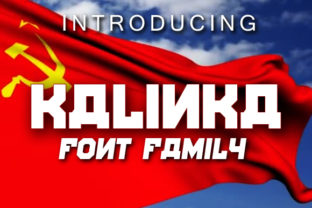
Kalinka: A Font Family That Feels Like a Creative Spark
When you’re scanning through hundreds of typefaces—filtering by weight, width, language support, or licensing—it’s rare for one to stop you mid-scroll. Kalinka does exactly that. Not because it shouts the loudest, but because it listens—to your layout, your brand voice, your audience’s expectations—and responds with quiet confidence and surprising versatility.
More Than Just “Pretty Letters”
Kalinka isn’t built for a single purpose. It’s designed to adapt without compromising character. At its core sits a warm, humanist sans serif structure—but with subtle quirks that keep it from fading into background noise. The terminals are gently flared. The lowercase a and g carry soft, open forms. Even the numerals feel intentional, not afterthoughts. These aren’t decorative flourishes; they’re functional details that improve rhythm, legibility, and emotional resonance across sizes and surfaces.
What makes Kalinka especially valuable today is how well it bridges contexts that used to demand entirely different fonts. You can use it for a minimalist SaaS dashboard and a handcrafted ceramics studio’s packaging—without needing to switch families or second-guess tone. That flexibility saves time, reduces design debt, and keeps visual identity cohesive across touchpoints.
How Kalinka Fits Into Real Design Workflows
Designers don’t pick fonts in a vacuum. They consider file size, variable axis support, fallback behavior, and whether the font renders cleanly on older Android devices or low-DPI screens. Kalinka was built with these realities in mind:
- Lightweight web implementation: The WOFF2 files are lean—under 40 KB for the full Latin+basic Cyrillic set—so it won’t drag down LCP or CLS scores.
- True variable support: Adjust weight (200–800), width (75%–125%), and optical size (small text vs. display) in a single file. No more juggling six separate static fonts just to get responsive typography right.
- Cross-platform consistency: Tested on Windows, macOS, iOS, and Android—not just in browsers, but inside Figma, Adobe apps, and even CMS editors like WordPress Gutenberg.
That means if you’re building a client site and need to serve clean headings on desktop, readable body copy on mobile, and bold accent text in an email campaign—all while staying within performance budgets—Kalinka handles it without requiring workarounds or compromises.
Where Kalinka Shines Most
Some fonts are generalists. Kalinka is a context-aware generalist. Here’s where its strengths align most powerfully with real-world needs:
Brand Systems That Grow With You
Startups often launch with a tight visual system—just one weight, maybe two colors, minimal assets. As they scale, that simplicity can become limiting. Kalinka scales *with* intention: its expanded weight range (from airy Thin to commanding Black) and optical sizing let teams evolve their typographic hierarchy without rebranding. One studio used Kalinka Light for their investor pitch deck, then switched to Kalinka Display for product launch banners—same family, no cognitive dissonance.
Digital Products With Personality
Too many UI fonts default to neutrality at the cost of warmth. Kalinka avoids that trap. Its generous x-height and open counters make small interface text (like form labels or status messages) highly scannable—even at 13px. Yet its bolder weights hold presence in modals, empty states, or onboarding flows. One fintech app replaced its generic system stack with Kalinka and saw a measurable increase in task completion rates during user testing—attributed partly to improved readability, but also to perceived trustworthiness in the type’s grounded, unhurried rhythm.
Editorial & Publishing Projects
Long-form content demands stamina—from both reader and typeface. Kalinka’s even color, balanced spacing, and gentle contrast reduce eye fatigue over extended reading. Its italics aren’t slanted copies; they’re redrawn with distinct letterforms, lending emphasis without visual chaos. Bloggers using Kalinka report fewer “bounce-backs” on longer posts, and magazine designers appreciate how smoothly it pairs with expressive serif companions for pull quotes or headlines.
Practical Considerations Before You Adopt Kalinka
Like any tool, Kalinka works best when matched thoughtfully to your goals. Here’s what smart users check first:
- Language coverage: Kalinka supports Latin, basic Cyrillic (including Russian, Bulgarian, Serbian), and common diacritics. It doesn’t yet include Greek, Vietnamese, or extended Arabic support—so if your project targets those regions, verify coverage before committing.
- Licensing clarity: Available under SIL Open Font License (OFL) for self-hosted use, with clear commercial permissions. If you're embedding in mobile apps or SaaS platforms, double-check the license terms for redistribution rights—some vendors require additional agreements for embedded use.
- Design system integration: Kalinka includes stylistic sets (like alternate ‘g’, ‘a’, or slashed zero) accessible via OpenType features. If your team uses CSS
font-feature-settingsor Figma’s typography controls, these add nuance without extra files. - Pairing potential: While Kalinka stands strong solo, it harmonizes beautifully with low-contrast serifs (think Playfair Display or Literata) for editorial contrast, or with geometric sans like Manrope for modern UI layering. Avoid pairing with other humanist sans families that share too many DNA traits—it can blur distinction.
Why Designers Keep Coming Back to Kalinka
It’s not just about aesthetics. It’s about flow. When Kalinka is in your toolkit, decisions get faster—not because it’s “safe,” but because it reliably delivers on multiple fronts: performance, expressiveness, accessibility, and scalability. One freelance designer told us she now uses Kalinka as her “default exploratory font”—dropping it into early wireframes and mood boards just to see how the content breathes. More often than not, it stays.
That ease doesn’t come from simplicity. It comes from deep attention—to how curves meet stems, how space balances mass, how a font behaves at 16px on a 1080p screen versus 96px on a billboard. Kalinka feels like a collaborator, not a component.
And perhaps that’s its quietest strength: Kalinka doesn’t ask you to bend your vision to fit the type. Instead, it bends—just enough—to reveal what your idea truly needs.
Getting Started With Kalinka
You can download Kalinka directly from its official source—no paywall, no trial period. The GitHub repository includes detailed documentation, variable font demos, and CSS snippets ready for copy-paste. For teams using font hosting services, it’s compatible with Google Fonts (via third-party proxies) and most self-hosted CDNs.
If you’re evaluating it for a live project, try this quick test: set your body copy at 18px/1.6 line height using Kalinka Regular, then swap in your current font. Read three paragraphs aloud. Notice where your eyes pause, where rhythm stutters or settles. That gap between expectation and experience? That’s where Kalinka starts to earn its place—not as decoration, but as infrastructure.
Because great typography doesn’t draw attention to itself. It draws attention to your message. And Kalinka? It knows exactly when to step forward—and when to step aside.