Rollex: An Elegant Display Font for Purposeful Design Decisions
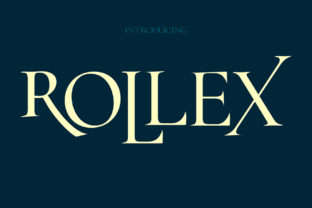
Rollex isn’t a tool you install and forget—it’s a deliberate choice. It’s the kind of display font that enters your workflow at a precise moment: when clarity meets intention, and visual tone must carry as much weight as the message itself. Designed with elegance, subtle magic, and quiet sophistication, Rollex delivers timeless appeal without sacrificing legibility or adaptability. It doesn’t shout. It commands attention through restraint—making it ideal for professionals who understand that typography is rarely about decoration, and almost always about communication strategy.
Where Rollex Fits in Real Workflows
Unlike utility fonts built for body text or interface elements, Rollex lives in the upper tier of design hierarchy: headlines, logos, cover art, presentation titles, brand statements, and key visual anchors. Its role emerges most clearly *after* core content is defined but *before* final presentation is locked down—when you’re refining how an idea lands, not what it says. That makes Rollex especially valuable during the “polish phase”: the stage where messaging, audience alignment, and aesthetic cohesion converge.
For marketers launching a campaign, Rollex might appear on hero banners or email subject lines—not to increase click-through rates directly, but to reinforce brand voice before the first sentence is read. For educators designing course modules, it could headline learning objectives or module milestones, subtly signaling importance and continuity across weeks of material. Freelancers building portfolio sites often use Rollex for project titles, letting the font’s confident rhythm elevate work samples without competing with imagery.
Integration Without Friction
Rollex works best when treated as a strategic layer—not a standalone solution. It pairs naturally with highly legible sans-serifs (like Inter, Lato, or Open Sans) for body copy, creating a clear visual hierarchy: Rollex sets the tone; supporting fonts handle the load. This pairing isn’t arbitrary. It reflects a practical workflow principle: separate the *what* from the *why*. Rollex answers “Why should this matter?” while the secondary font handles “What exactly does it mean?”
Compatibility is straightforward. Rollex is available in standard web font formats (WOFF2, WOFF) and supports modern CSS features like variable weight axes and OpenType stylistic sets. That means you can adjust its presence—tightening letter-spacing for impact in a logo, or loosening it slightly for readability in a responsive heading—without switching fonts. No plugins or proprietary platforms are required. It integrates cleanly into Figma libraries, WordPress theme customizers, Canva brand kits, and static site generators alike.
Preparation Matters More Than You Think
Before applying Rollex, clarify two things: purpose and scale. Ask: Is this heading meant to guide, persuade, introduce, or commemorate? And will it appear at 48px on a desktop landing page—or 24px on a mobile notification banner? Rollex performs exceptionally well above 36px, where its fine details and balanced proportions shine. Below 24px, its decorative nuances soften, and legibility begins to trade off against personality. That’s not a flaw—it’s a signal. Use it accordingly.
Also consider language support. Rollex includes full Latin character sets and common diacritics, making it viable for multilingual branding across English, Spanish, French, German, and Portuguese contexts. If your audience includes Turkish, Romanian, or Vietnamese speakers, verify glyph coverage early—some extended accents may require manual fallbacks or adjustments in your CSS stack.
Workflow Examples Across Roles
- Small business owners use Rollex for storefront signage mockups *before* ordering prints—testing contrast, spacing, and scale against real-world lighting conditions. They export PDF proofs with embedded Rollex, then review them on tablets and phones to simulate customer perspective.
- Bloggers and content creators apply Rollex only to post titles and newsletter headers—never subtitles or pull quotes. This maintains consistency across RSS feeds, email clients, and social previews, where font substitution is common. They pair it with system-safe fallbacks (e.g.,
"Rollex", "Segoe UI", system-ui) to preserve hierarchy even when Rollex isn’t loaded. - Educators building digital courses embed Rollex in LMS-compatible SCORM packages using inline
@font-facedeclarations. They limit its use to module-level headings—not slide-by-slide text—reducing file bloat and ensuring fast load times across low-bandwidth student connections. - Product managers documenting roadmaps use Rollex in Figma to label quarterly themes (“Q3: Trust & Transparency”) while keeping feature bullets in a neutral sans-serif. This creates visual breathing room between strategic framing and tactical detail—helping stakeholders parse intent before diving into execution.
Consistency Over Time, Not Just Pixels
Long-term use of Rollex depends less on technical setup and more on disciplined application. The biggest risk isn’t poor rendering—it’s overuse. Because Rollex feels distinctive, there’s temptation to apply it everywhere: buttons, captions, testimonials, even footers. But that dilutes its power. Instead, treat it like a signature: used once, meaningfully, where recognition and resonance matter most.
Build a simple usage guide—even if just for yourself. Define: one primary weight (e.g., SemiBold), one maximum size range (e.g., 36–96px), and three approved contexts (e.g., homepage headline, report cover, brand guidelines document title). Revisit that guide every six months. Ask: Has our audience shifted? Has our visual language matured? Does Rollex still reflect where we’re going—not just where we’ve been?
Quality Control Starts With Testing
Don’t assume Rollex looks consistent across devices. Test it in real conditions: Safari on iOS, Chrome on Android, Firefox on Linux, Edge on Windows. Pay attention to hinting behavior at smaller sizes and how anti-aliasing affects stroke contrast on high-DPI screens. A quick test: open your live page on a smartphone, zoom to 200%, and scroll slowly. Does the font hold shape? Does spacing remain even? If letters appear to “wobble” or tighten unpredictably, adjust line-height or letter-spacing values—not the font itself.
Also test accessibility. Rollex passes WCAG AA contrast requirements at 48px+ against white or near-white backgrounds—but fails at smaller sizes unless background contrast is increased significantly. Always validate with tools like axe or WAVE, and supplement with manual keyboard navigation tests. Remember: elegance shouldn’t come at the cost of inclusion.
Efficiency Through Intentionality
Rollex saves time not by automating tasks, but by reducing decision fatigue. When you’ve already decided *where* and *how* Rollex fits, you stop debating font choices mid-project. That mental bandwidth shifts toward stronger copy, better structure, or sharper user flows. One designer reported cutting 15–20 minutes per layout revision simply by locking Rollex into their design system tokens—no more second-guessing whether “this headline needs more gravitas.”
That efficiency compounds. Teams using Rollex across marketing, product, and support materials report faster stakeholder alignment—because Rollex acts as a shared visual shorthand. When legal reviews a press release headline set in Rollex, they recognize it as “final-stage branding,” not a draft placeholder. That small cue accelerates feedback cycles and reduces back-and-forth.
Rollex doesn’t replace process—it sharpens it. It won’t fix weak messaging or unclear goals. But when applied with purpose, it helps ensure that the moments people remember—the first impression, the decisive header, the closing statement—are rendered with the weight and grace they deserve. That’s not magic. It’s craftsmanship, made visible.