Glitch Simple
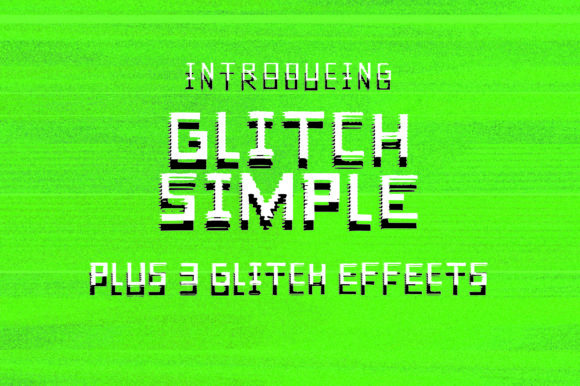
Glitch Simple isn’t just another retro font—it’s a deliberate nod to the early days of digital expression, where pixelated edges, subtle misalignments, and controlled instability felt honest. Inspired by computer errors—not as failures, but as unexpected moments of character—this font balances vintage charm with clean, functional readability. It’s not overly noisy or chaotic; instead, it uses restrained distortion: slight letter-spacing inconsistencies, soft horizontal offsets, and crisp monospaced geometry that feels both nostalgic and freshly usable today.
When You Need a Digital Pulse Without the Clutter
Think about the last time you designed a social media post for an indie music release, updated your portfolio homepage, or mocked up a workshop flyer for a coding bootcamp. If your go-to fonts felt either too sterile (looking at you, Helvetica Neue) or too distracting (yes, even some “glitch” fonts cross into unreadable territory), Glitch Simple steps in with purpose. It delivers digital texture without sacrificing clarity—especially at medium to large sizes. That makes it ideal when you want viewers to pause, recognize intention, and feel the energy behind your message—not get stuck decoding it.
Real Projects, Real Decisions
A freelance graphic designer used Glitch Simple for a limited-edition vinyl sleeve for a synthwave artist. The font’s subtle horizontal shift on uppercase letters echoed the analog tape wobble in the audio—no extra effects needed. A small-batch coffee roaster applied it to their seasonal bag labels: the clean letterforms held up on matte kraft paper, while the digital edge quietly reinforced their “tech-meets-craft” brand voice. Even a high school computer science teacher dropped it into a slide deck header for a unit on binary and data integrity—students immediately associated the look with “how computers actually behave,” not just textbook abstractions.
Where It Fits—and Where It Doesn’t
Glitch Simple shines in contexts where personality matters *and* legibility stays non-negotiable. That includes:
- Digital interfaces: App launch screens, dashboard headers, or interactive exhibit titles—where users scan quickly but should feel immersed in tone.
- Printed ephemera: Zines, event posters, exhibition signage, or product packaging that benefits from tactile contrast (e.g., sharp font + grainy paper).
- Educational materials: Coding workshop handouts, STEM fair banners, or university course syllabi wanting to signal curiosity over conformity.
- Branded content: Newsletter headers, podcast cover art, or YouTube thumbnails where visual distinction helps cut through algorithmic noise.
It’s less effective for body text, legal disclaimers, multilingual documents with complex scripts, or environments where accessibility is the top priority *and* contrast or spacing can’t be adjusted. While Glitch Simple meets basic WCAG contrast guidelines at larger sizes, its intentional irregularities mean it’s best reserved for headlines, logos, short callouts—not paragraphs you expect people to read for more than 10 seconds.
Who Benefits—and How
Bloggers and content creators use Glitch Simple to reinforce niche identity—say, a newsletter about retro tech restoration or AI ethics. The font doesn’t shout “I’m quirky!”; it quietly says, “I pay attention to how tools shape meaning.” That builds trust faster than forced whimsy.
Small business owners, especially those in creative services or maker-based fields, find it bridges professionalism and approachability. A UX consultant might use it in a proposal cover to hint at systems-thinking and human-centered design—without resorting to clip art or overused tech icons.
Educators and trainers appreciate how it sparks conversation. One community college instructor reported students asking, “Why does this ‘A’ look slightly off-center?”—which led directly into a 20-minute discussion on rendering engines, font hinting, and why “perfect” pixels often require compromise. The font became a teaching tool, not just decoration.
Freelancers and agencies rely on it for client-facing mood boards or pitch decks where differentiation matters. In a sea of similar-looking presentations, Glitch Simple adds tonal specificity—suggesting innovation grounded in craft, not trend-chasing.
What to Consider Before You Use It
First, ask: Is the “glitch” serving the message—or just decorating it? If your goal is clarity above all (e.g., safety instructions, medical info, transit signage), skip it. But if your goal is to evoke curiosity, signal technical fluency, or honor analog-digital hybrid culture, Glitch Simple earns its place.
Second, test it in context—not just in your font menu. Drop it into your actual layout. Try it on the device and screen size your audience will likely see it on. Some distortions become more pronounced on lower-DPI displays or when scaled down in email clients. What reads as “playful tension” on a desktop browser might feel “off-kilter” in a mobile notification preview.
Third, check licensing. Glitch Simple is available under both free and commercial licenses—but usage rights vary. If you’re embedding it in a SaaS dashboard, selling merchandise with it printed front-and-center, or bundling it with a WordPress theme, verify the license covers that scope. Most creators don’t realize until post-launch that “free for personal use” doesn’t extend to client work—even pro bono projects sometimes require upgrade.
And finally: pair it thoughtfully. It pairs naturally with neutral sans-serifs (like Inter or IBM Plex Sans) for body text, or even modest serifs (such as Literata or PT Serif) for contrast. Avoid stacking it with other “digital” or “futuristic” fonts—that dilutes its impact and risks visual noise. Let Glitch Simple lead; let the supporting type recede.
Not Just a Font—A Design Decision
Choosing Glitch Simple isn’t about chasing retro aesthetics. It’s about choosing precision with personality. It’s for the educator who wants students to question how interfaces shape perception. The marketer who knows authenticity now lives in subtlety—not stock imagery or exaggerated effects. The developer designing a CLI tool who wants the welcome screen to feel like a quiet wink, not a shout.
You’ll know it’s working when people don’t say, “Cool font!”—but instead pause, lean in, and ask, “What’s the story behind this?” That’s when Glitch Simple has done its job: not as decoration, but as quiet, confident communication with roots in real digital history—and eyes on what comes next.